

协议版本: 2024-11-05
用户交互模型
Prompts are designed to be 用户控制的, meaning they are exposed from servers to clients with the intention of the user being able to explicitly select them for use. 通常,提示会通过用户在界面中发起的命令触发,这使得用户能够自然地发现并调用可用的提示。 例如,以斜线命令形式: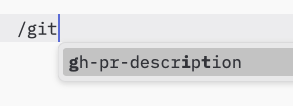
能力
Servers that support prompts 必须 declare theprompts capability during
initialization:
listChanged indicates whether the server will emit notifications when the list of
available prompts changes.
协议消息
展示提示项列表
要获取可用提示,客户端发送一个prompts/list请求。此操作支持分页。
请求:
获取提示
To retrieve a specific prompt, clients send aprompts/get request. Arguments may be
auto-completed through the completion API.
请求:
列表变更通知
当可用提示列表发生变化时,声明了listChanged
功能的服务器应当发送通知:
消息流
数据类型
提示
一个提示定义包含:name: 提示的唯一标识符description: 可选的人类可读描述arguments: 可选的参数列表,用于自定义
提示消息
提示消息可以包含:role: 可以是“用户”或“助手”用以标识发言者content: 以下内容类型之一:
文本内容
文本内容代表纯文本消息:图像内容
图像内容允许在消息中包含视觉信息:嵌入资源
嵌入式资源允许直接在消息中引用服务器端资源:- 有效的资源URI
- 适当的MIME类型
- 文本内容或 base64 编码的二进制数据
错误处理
Servers 应当 return standard JSON-RPC errors for common failure cases:- 无效的提示名称:
-32602(无效参数) - 缺少必需的参数:
-32602(无效参数) - 内部错误:
-32603(内部错误)
实施注意事项
- 在处理之前,服务器 必须 验证 prompt 参数
- 客户端应当处理大型提示列表的分页
- 双方应尊重能力协商